


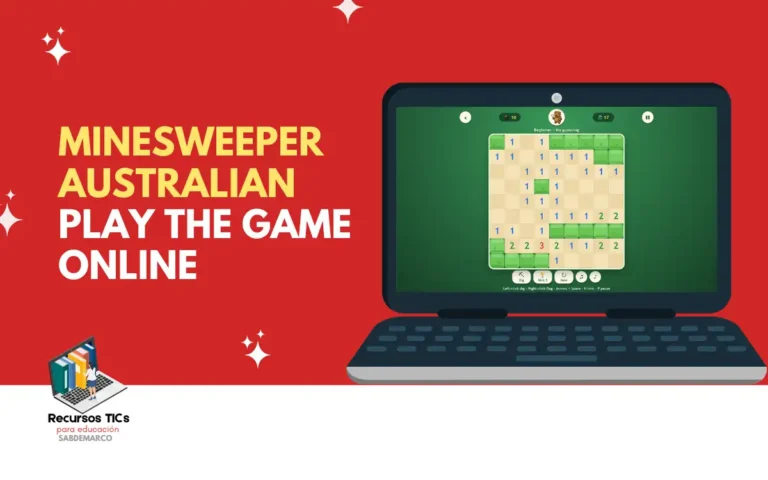
Mines Weeper is a free online version of the classic Minesweeper puzzle, where you clear a grid of covered squares by reading number clues and avoiding hidden mines. It matters because it trains logical thinking in short, replayable rounds that work on phones, tablets and computers without a download. This edition includes Beginner, Intermediate, Expert and Custom boards, a no-guess mode, hints, undo and a Daily Challenge shared by every player.
What is Mines Weeper?
Mines Weeper is a single-player puzzle game played on a grid where some squares hide mines and your goal is to uncover every safe square without setting one off. It grows out of the Minesweeper original that Microsoft bundled with Windows 3.1 in 1992, which turned a simple minesweeper computer game into one of the most played desk-break habits in office history. This browser version keeps the same rules but swaps the grey military look for a friendly garden theme, with Digger the wombat explorer and his magnifying glass guiding the way.
In practice, every square you dig shows either a blank space or a number from 1 to 8. That number tells you how many mines touch the square, diagonals included, so each reveal works as a clue instead of a random result. Unlike many minesweeper video game clones packed with pop-ups, this one runs straight in the browser with no account required. On top of that, it adds modern tools such as a timer, a mine counter, a pause button, three hints per board and a one-time undo for when a mine catches you off guard.
What age is Mines Weeper suitable for?
Mines Weeper suits kids from about 7 or 8 years old, teens and adults, because it only asks players to count to eight and reason about the squares around each number. In a classroom or at home, it works as a low-pressure logic exercise where students learn that every move should rest on evidence from the board rather than luck. For that reason, many teachers use a quick round as a warm-up before math class, and families enjoy it as screen time that actually exercises the brain.
Younger players do best on the 9×9 Beginner board with no-guess mode switched on, since every board can then be solved by logic alone and frustration stays low. Kids between 10 and 12 are usually ready for Intermediate, flags and chording, while teens and adults tend to chase faster times on Expert or the Daily Challenge. Meanwhile, keyboard controls make the game more accessible for students who find a mouse tricky, so the whole class can join in.
| Age | Recommended board | Suggested settings |
|---|---|---|
| 7 to 9 | Beginner (9×9, 10 mines) | No guessing on, music on |
| 10 to 12 | Intermediate (16×16, 40 mines) | No guessing on, try chording |
| 13 and up | Expert (30×16, 99 mines) or Daily Challenge | No guessing off for a real challenge |
How do you play Mines Weeper?
To play Mines Weeper, open the game in any browser, pick a difficulty and click or tap a square to start digging, since your first dig is always safe. After that, you read the numbers to work out where the mines are, flag them and clear everything else. Here’s the minesweeper game how to play routine to get your first board going:
- Open the Mines Weeper game in Chrome, Safari, Edge or Firefox on your phone, tablet or computer.
- Choose a level: Beginner, Intermediate, Expert, Custom or the Daily Challenge.
- Switch No guessing on if you want every board to be solvable by pure logic.
- Click or tap any square to make your first dig and open up the board.
On a computer, left-click to dig and right-click to plant a flag on any square you believe hides a mine. On a touchscreen, tap to dig and press and hold to flag, or toggle the pickaxe and flag button so you never flag by accident. Keyboard players can move with the arrow keys, dig with Space or Enter, flag with F, ask for a hint with H, pause with P and start a new board with N.
The core skill is reading numbers. If a 1 touches only one covered square, that square must be a mine, so flag it straight away. Once a number has all its mines flagged, every other square around it is safe. At that point, click the number itself to «chord»: the game digs all its remaining neighbors at once, which saves plenty of time on larger boards.
Whenever you get stuck, press the hint button to reveal a safe square, though each hint adds 15 seconds to your clock. If you hit a mine, you can undo that single move, but the game won’t count that round toward your best time. You win when every non-mine square is uncovered, and your results land in the Your stats panel so you can track your progress.
You might also be interested in: ClueFinders Toy Store: Play the Classic Learning Adventure Online
Minesweeper tips: a quick guide to winning more boards
The best minesweeper tips come down to working from certainty and only guessing as a last resort. This short minesweeper guide covers the habits that separate a lucky win from a consistent one, whether you play the 9×9 board or the full 99-mine grid. Try one tip per session and you’ll notice the difference within a few games.
- Start with the easy reads: look for 1s that touch a single covered square.
- Learn wall patterns: a 1-2-1 along an edge means mines sit under both 1s, and a 1-2-2-1 means mines sit under both 2s.
- Flag only when you’re sure, because the mine counter relies on accurate flags.
- Use chording on every satisfied number to clear space faster.
- Save hints for the final corner of the board, where guesses usually happen.
- Play the Daily Challenge to compare your time against everyone else on the same board.
What games are inside Mines Weeper?
Mines Weeper includes five ways to play: four board sizes (Beginner, Intermediate, Expert and Custom) plus a Daily Challenge, and you can switch no-guess mode on for any of them. Each one changes how dense the mines are, which is what really controls the difficulty. The table below shows how the mine density climbs from about 12% on Beginner to nearly 21% on Expert.
| Mode | Grid | Mines | Share of squares with a mine |
|---|---|---|---|
| Beginner | 9 × 9 | 10 | 12.3% |
| Intermediate | 16 × 16 | 40 | 15.6% |
| Custom | 12 × 12 | 25 | 17.4% |
| Expert | 30 × 16 | 99 | 20.6% |
- Beginner: a 9×9 grid with 10 mines and the ideal starting point for kids and first-timers. It teaches the basic number logic in rounds that usually last under two minutes.
- Intermediate: a 16×16 grid with 40 mines that introduces longer chains of deduction. It’s the right level to practice flags, chording and the classic edge patterns.
- Expert: a 30×16 grid with 99 mines, where roughly one square in five is dangerous. It rewards speed, pattern recognition and calm decision-making under a ticking timer.
- Custom: a 12×12 board with 25 mines that sits between Intermediate and Expert in density. It works well as a stepping stone before you take on the full Expert grid.
- Daily Challenge: one board that’s the same for everyone that day, so friends and classmates can compare times fairly. It also builds a healthy daily habit of short, focused play.
- No-guess mode: the minesweeper no guess option makes every board solvable by logic alone, so you never lose to a coin flip. It’s the setting most teachers and parents should keep on for younger players.
If you’re searching for minesweeper infinite, note that this version doesn’t offer an endless scrolling map. Instead, the New button generates unlimited fresh boards, so you can keep playing minesweeper free for as long as you like. For anyone looking for a minesweeper free online option without sign-ups, that endless supply of boards covers the same need.
You might also be interested in: Oregon Trail II: Play the 1995 Classic Online Free in Your Browser
What skills does a child develop with Mines Weeper?
Mines Weeper helps children build logical reasoning, number sense and focus, because every safe move has to be worked out from the clues on the board. Unlike fast-reflex games, it rewards slowing down and thinking before acting, which carries over to schoolwork and everyday problem-solving. These are the main skills kids practice each time they play this minesweeper game online:
- Logical deduction: kids combine several number clues to reach a certain conclusion about a hidden square.
- Number sense: counting neighbors and comparing them to the number shown strengthens quick mental arithmetic.
- Spatial reasoning: reading a grid, diagonals included, trains children to see relationships between positions.
- Working memory: holding several clues in mind at once builds the short-term memory used in reading and math.
- Patience and impulse control: the game punishes random clicking and rewards checking before acting.
- Risk assessment: when a guess is unavoidable, kids learn to compare options and pick the safer one.
- Resilience: undo, new boards and the Daily Challenge teach that a mistake is a step toward the next win, not the end.
- Concentration: short, quiet rounds build sustained focus without overstimulating sounds or visuals.
What’s your best time on the Expert board, and do you play with no-guess mode on or off? Share your record and your favorite minesweeper tip in the comments.