



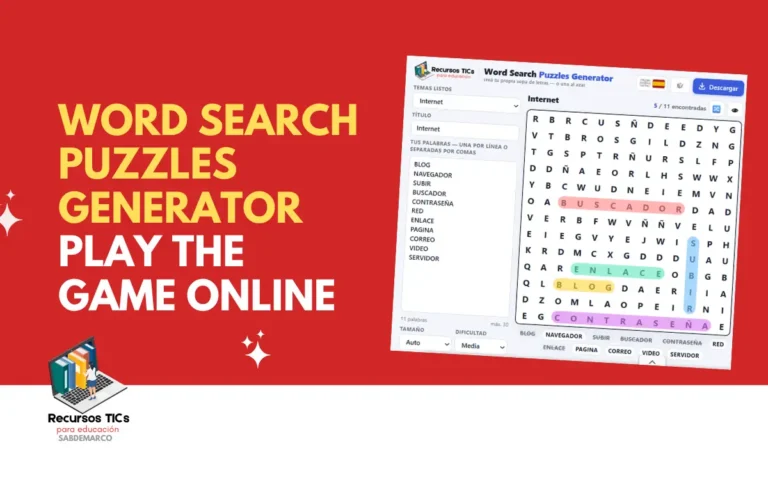
A word search puzzles generator is a free tool that turns any list of words into a ready-to-play letter grid in just a few seconds. It saves teachers, parents and puzzle fans hours of work, because they get custom activities without buying books or installing software. The Recursos TICs generator runs straight from the browser on a computer, tablet or phone, and it works for classroom vocabulary, themed party games and hard challenges for adults.
What is a word search puzzles generator?
A word search puzzles generator is an online program that hides your chosen words inside a grid of random letters, placing them horizontally, vertically, diagonally or even backwards. You type the words, pick the grid size and the difficulty, and the tool handles the rest: it checks that every word fits, fills the empty squares and builds the answer key. In other words, it works as a word search puzzles maker free of charge, so you never have to draw a grid by hand or buy another activity book.
Beyond building grids, the generator also behaves like a word search puzzles app that needs no download. Since it lives in the browser, it opens the same way on a Windows laptop, a Chromebook, an iPad or an Android phone, and the grid adapts to each screen. You can solve the puzzle right on the screen or save it as a word search puzzles pdf to print later. For teachers, that means one single tool covers both digital lessons and paper worksheets, and for families it means word search puzzles games free to play on any device at home, with no account and no setup.
Keep reading: Play Math Blaster In search of spot: online games
What age is the word search puzzles generator for?
The word search puzzles generator suits kids from about 6 years old all the way up to adults and seniors, because you control the grid size, the word length and the directions. At school, it supports spelling, vocabulary review and reading practice in any subject, from science terms to English as a foreign language. All you need to do is adjust the settings to the group: a first grader needs a small grid with short words, while a teenager can handle a dense grid full of hidden diagonals.
On the other hand, adults use it as a relaxing brain workout and as word search puzzles to print for adults on topics like travel, cooking, sports or movies. Seniors and people with low vision get the most out of word search puzzles printable large print, with fewer letters and bigger squares that are easier to read on paper. This quick guide helps you pick the right settings for each age group:
This app was developed by Sabrina Demarco, CEO of RecursosTICs.com.
| Age | Grid size | Word directions | Suggested word list |
|---|---|---|---|
| 6 to 7 years | 8 x 8 | Left to right and top to bottom | 6 to 8 short words (cat, sun, red) |
| 8 to 10 years | 10 x 10 to 12 x 12 | Adds diagonals | 10 to 12 words from a school unit |
| 11 to 14 years | 12 x 12 to 15 x 15 | All directions, including backwards | 12 to 15 subject-specific terms |
| Teens and adults | 15 x 15 or larger | All directions, with shared letters | 15 to 25 long or themed words |
| Seniors (large print) | 10 x 10 to 12 x 12 | Forward directions only | 8 to 12 familiar words |
How do you play with the word search puzzles generator?
To play, open the generator on this page from any browser, type your words and create the puzzle with one click; there’s nothing to install and no sign-up. It runs on a computer, a tablet or a phone, so students can use it in the computer lab, on a classroom tablet or on their own mobile at home.
Follow these steps to build your first word search puzzles generator:
- Type or paste your word list into the words box.
- Choose the grid size and the difficulty level.
- Click the button to generate the puzzle.
- Find the words by dragging across the letters with the mouse, or with your finger on a touch screen.
- Print the puzzle or save it as a PDF to use it on paper.
Once the grid is ready, the game works like any classic word hunt: scan the rows, columns and diagonals until you spot the first letter of a word, then follow it to the end. Every word you find gets marked, so kids can see their progress at a glance. That instant feedback is what turns a simple vocabulary list into one of those word search puzzles online free that students actually ask to repeat.
If someone gets stuck, the answer key acts as a built-in word search puzzles solver and shows where each word is hiding. Teachers can use it to check worksheets in seconds, and players can peek at a single word instead of giving up on the whole grid. For a tougher round, switch to the hard settings and let the generator hide words backwards and diagonally.
Finally, when you want the activity on paper, export it as a word search puzzles printable pdf and print as many copies as you need. Print one sheet with the puzzle for students and a second one with the solution for you. That makes it easy to prepare a full set of homework, early-finisher activities or substitute-teacher plans in under ten minutes.
Keep reading: Aprende inglés con el bosque bilingüe para niños de 6 a 10 años
What types of puzzles can you create with the generator?
With the generator you can create classic, hard, themed, large print and printable puzzles from the same screen, simply by changing the settings. These are the main options:
- Classic puzzles: words run left to right and top to bottom in a medium grid. They’re perfect for beginners, warm-ups and a quick five-minute break in class.
- Hard puzzles: word search puzzles hard mode hides terms backwards, diagonally and crossing each other in a large grid. It’s the best option for teens and adults who want a real challenge.
- Themed classroom puzzles: load the vocabulary of a lesson, such as the planets, the parts of a cell or irregular verbs. Students review the content while they play, and you get a ready-made activity for any unit.
- Large print puzzles: fewer letters and bigger squares make the grid easier to read. They work well for seniors, young children and anyone who prefers a comfortable paper format.
- Word Search puzzles printable hard: save any puzzle as a PDF and print it for homework, waiting rooms, trips or family game nights. It’s the fastest way to get word search puzzles free without buying activity books.
- On-screen play: solve the grid directly on a computer, tablet or phone. It turns the activity into word search puzzles games that kids can play at home or during a digital lesson.
- Answer key: every puzzle comes with its solution. It helps teachers correct quickly and lets players confirm their answers on their own.
Keep reading: Mavis Beacon: Play the Classic Typing Game Online for Free
What skills does a child develop with the word search puzzles generator?
A child who plays with the word search puzzles generator strengthens spelling, vocabulary, attention and visual scanning, all while having fun. In addition, when kids create their own puzzles, they practice writing and organizing words, which takes learning one step further. These are the main skills:
- Spelling: finding a word letter by letter fixes its correct spelling in memory.
- Vocabulary: themed lists introduce and review new words from every subject.
- Visual scanning: searching rows, columns and diagonals trains the eyes to read in an organized way.
- Concentration: staying focused on one grid until the end builds longer attention spans.
- Pattern recognition: spotting letter combinations quickly supports reading fluency.
- Spatial orientation: following words in eight directions develops a sense of space and position.
- Fine motor skills: dragging the mouse or a finger across the letters improves hand precision.
- Persistence: working through a hard grid without giving up builds tolerance to frustration.
- Digital skills: creating, saving and printing a puzzle teaches kids to use a web tool on their own.
Have you tried the generator with your students or your family yet? Tell us in the comments which topic you turned into a puzzle and how long it took them to find all the words.